


Forwarding Policy
Policy Overview
Section titled “Policy Overview”Policies are the main part of data aggregation and triage, and are used to configure the flow of traffic from input, to filtering, and to output in a completed process.
To complete the forwarding you need to create a set of policies, click the Create Policy button, you can configure the policy name, inbound interface, outbound interface, mirroring direction, and optionally add a specified VLAN.
Two Models of policy
Section titled “Two Models of policy”Currently there are two modes of forwarding strategy, one is mirroring mode and the other is forwarding mode
- Mirror mode: the entrance will be based on ACL matching an additional mirror traffic, does not affect the original non-ACL service, if the original service has an ACL rule, then the ACL will confirm the priority to decide which ACL rule to hit, when the entrance is more will affect the performance (4~8 ports), span, rspan are mirror mode.
- Forwarding mode: ingress RX traffic will be forwarded directly by ACL, ACL priority is higher than Layer 2 and Layer 3 forwarding, so it may affect the original service, but the performance is higher, forward belongs to the forwarding mode.
In the forwarding policy must be completed, the WEB UI will display the current forwarding policy mode, forwarding mode can not be switched can only be deleted and reconfigured.
The following are the differences in the function of several types of policies:
| Policy Type | SPAN | RSPAN | Forward |
|---|---|---|---|
| Add vlan on policy | × | √ | √ |
| Add or delete vlan on ACL | × | × | √ |
| Multiple egress (replication) | √ | × | √ |
| Performance loss | √ | √ | × |
| Impacts original service (non-ACL service) | × | × | √ |
| Tunnel stripping | × | × | √ |
The following constraints are imposed by port type for different policy modes:
| Port Type | As an input port under SPAN/RSPAN type | As an output port under SPAN/RSPAN type | As an input under forward type | As an output under forward type |
|---|---|---|---|---|
| hybrid | √ | √ | √ | √ |
| network | × | × | √ | × |
| tool | × | √ | × | √ |
| service | √ | × | × | × |
Policy Configure
Section titled “Policy Configure”Policy Creation
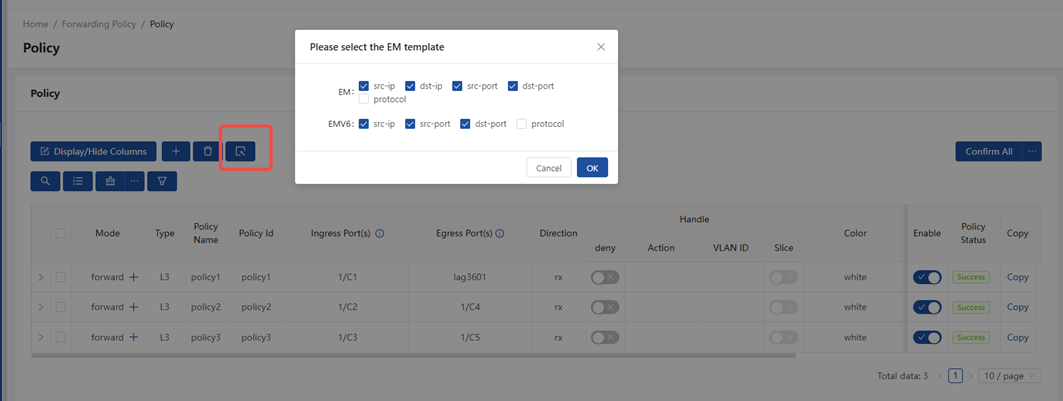
Section titled “Policy Creation”Before creating EM/EMv6 policies, you must configure the global template. If the rule match items do not align with the template, the policy cannot be applied. If EM/EMv6 policies are already applied, the template cannot be modified; you must disable the policies first before making changes to the template.
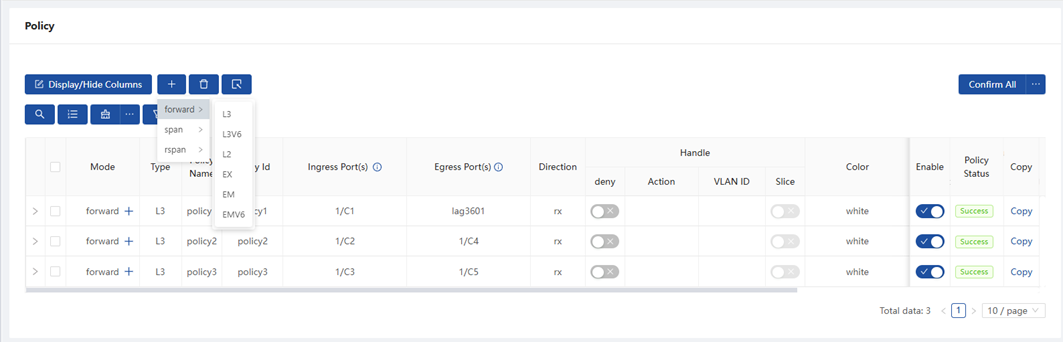
When creating a policy, drag the mouse to + to select a policy mode, and select a rule type, including:
- L3: rules can filter the network layer key of the IPV4 message, and support transparent transmission of all IPv4, IPv6, and non-IP packets.
- L3V6: rules can filter the network layer key of the IPV6 message, and support transparent transmission of all IPv4, IPv6, and non-IP packets.
- L2: rules can filter the link layer key such as MAC, VLAN, ether type ( multiple ether type filtering the innermost layer).
- EX: rules are extensions of L2 rules that can additionally filter IPV4 source IPs or TCP Flag, VNI, and so on regardless of the IP version.
- EM rules can filter any combination of the IPv4 5-tuple (src-ip, dst-ip, ip-protocol, src-port, dst-port).
- EMv6 rules can filter any combination of the IPv6 4-tuple(src-ipv6, ip-protocol, src-port, dst-port).
Globally, only one EM template and one EMv6 template can be filtered.
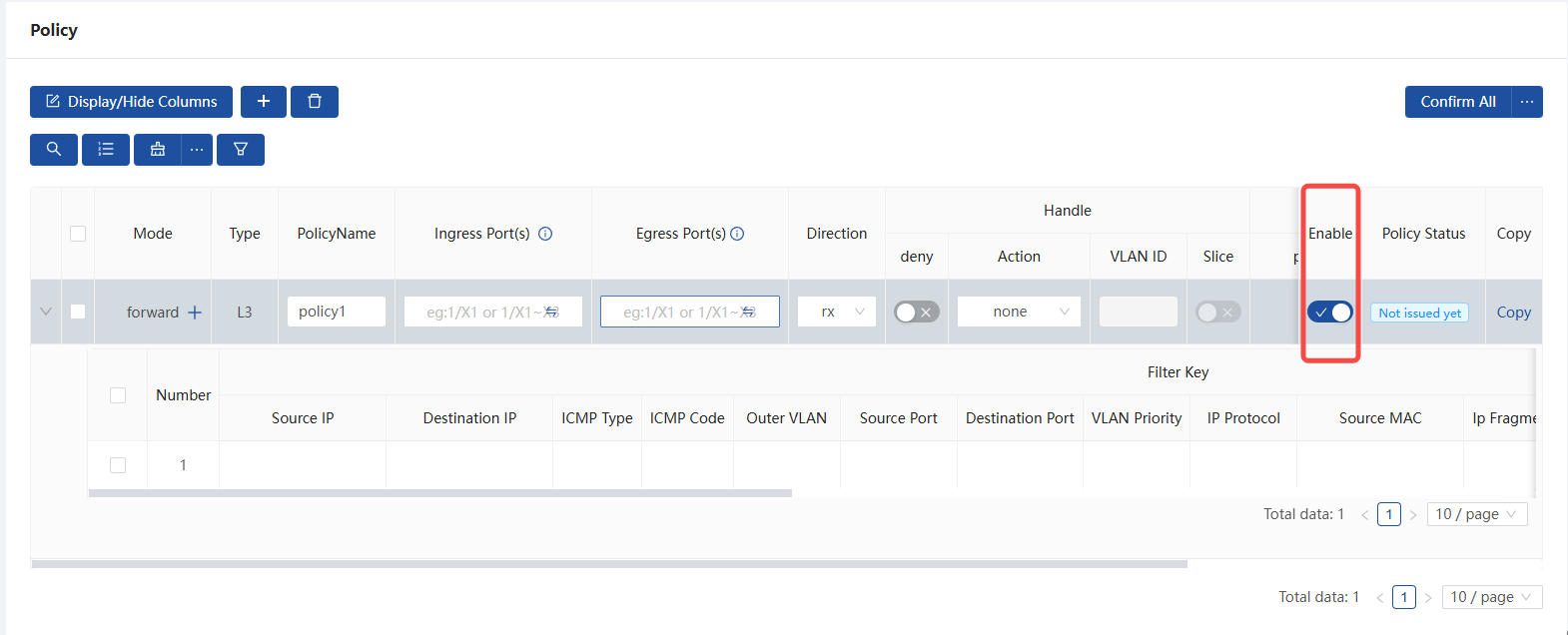
After the policy is created, an initial rule will be added by default, and you can make desired changes to the initial rule or click + after the mode to add a new rule to the policy, and the keys of different modes of the policy are slightly different.
After the strategy is created, it is set to enabled mode by default. It can be switched to disabled mode, and then it will only be stashed on the web and will not be issued to the device’s underlying layer.
Policy configure
Section titled “Policy configure”| Key words | Description |
|---|---|
| PolicyName | Name for policy |
| Policy Id | Policy ID is associated with acl name for CLI commands; this field is initially set to the same value as the policy name upon first configuration and cannot be modified thereafter. |
| Ingress Port(s) | support one port or multi-ports or one lag or multi-lags as ingress ports |
| Egress Port(s) | support redirecting to an interface or multi-interfaces or a lag or lags. Ports and lags can be added together. |
| Direction | only rx is supported |
| deny | deny means the packet is not forwarded but can be normally trapped; not deny means permit |
| Handle action | add-vlan: Add new vlan, range 1-4094. Not support for multi-redirections. |
| modify-vlan: Modify outer-vlan, range 1-4094. Not support for multi-redirections. | |
| pop-vlan: Pop outer-vlan. | |
| Slice | Enables message truncation, with a fixed truncation limit of 128 bytes |
| Color | support to highlight policy with different colors and support to filter policy with color |
Rule configure
Section titled “Rule configure”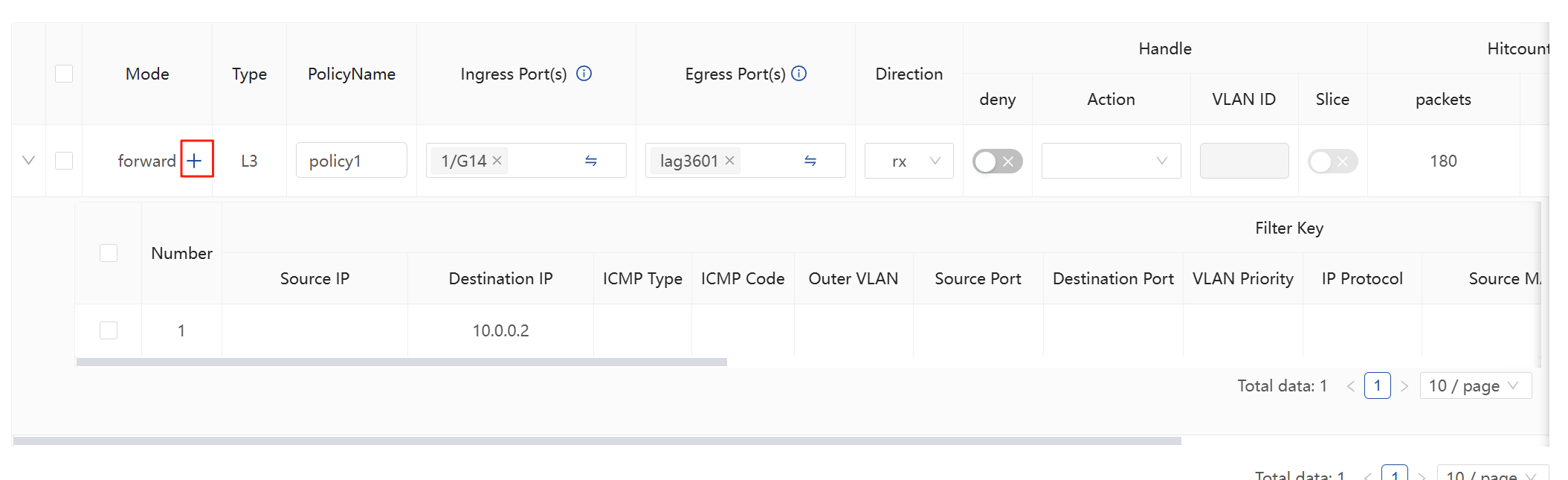
The supported match fields for different types of ACL tables vary, and the specific match fields for each type of ACL table are described below.
- L2 ACL match fields
| Key words | Description of parameters | Notes |
|---|---|---|
| src-mac | Specify source mac address: nn:nn:nn:nn:nn:nn | Supported only in the ingress direction. |
| dst-mac | Specify destination mac address: nn:nn:nn:nn:nn:nn | Supported only in the ingress direction. |
| ethernet-type | Specify ethernet protocol type, range: 0-FFFF | Supported only in the ingress direction. |
| outer-vlan | Specify outer VLAN id, range: 1-4094 | Supported only in the ingress direction. |
| Handle action | add-vlan: Add new vlan, range 1-4094. Not support for multi-redirections. | |
| modify-vlan: Modify outer-vlan, range 1-4094. Not support for multi-redirections. | ||
| pop-vlan: Pop outer-vlan. | Supported only in the ingress direction. | |
| Add Timestamp | Add timestamp, ptp needs to open manually with cli commands, see adding timestamp | Supported only in the ingress direction. |
| Modify Destination MAC | Modify dst-mac: nn:nn:nn:nn:nn:nn | Supported only in the ingress direction. |
- ** L3 ACL match fields**
| Key words | Description of parameters | Notes |
|---|---|---|
| src-mac | Specify source mac address: nn:nn:nn:nn:nn:nn | Supported only in the ingress direction. |
| outer-vlan | Specify outer VLAN id, range 1-4094 | |
| vlan-pri | Specify outer VLAN priority, range 0-7 | |
| ip-protocol | Specify IP protocol, range0-255 | |
| src-ip | Specify source IP address: A.B.C.D(/mask) | |
| dst-ip | Specify destination IP address: A.B.C.D(/mask) | |
| icmp-type | Specify type of ICMP, range 0-16 | Supported only in the ingress direction. |
| icmp-code | Specify code of ICMP, range 0-5 | Supported only in the ingress direction. |
| src-port | Specify L4 source port, range 0-65535 | |
| dst-port | Specify L4 destination port, range 0-65535 | |
| ip-fragment | Specify IP Fragment: ANY, All ip-fragment packets | Supported only in the ingress direction. |
| src-port-range | Specify Src port range, eg:1024-65535 | Supported only in the ingress direction. |
| dst-port-range | Specify Dst port range, eg:1024-65535 | Supported only in the ingress direction. |
| src-port-exclude | Specify L4 source port, range: 0-65535 | Supported only in the ingress direction. |
| dst-port-exclude | Specify L4 destination port, range: 0-65535 | Supported only in the ingress direction. |
| dscp | Specify DSCP of IP header, range: 0-63 | Supported only in the ingress direction. |
| Handle action | add-vlan: Add new vlan, range 1-4094. Not support for multi-redirections. | |
| modify-vlan: Modify outer-vlan, range 1-4094. Not support for multi-redirections. | ||
| pop-vlan: Pop outer-vlan. | Supported only in the ingress direction. | |
| Add Timestamp | Add timestamp, ptp needs to open manually with cli commands, adding timestamp | Supported only in the ingress direction. |
| Modify Destination MAC | Modify dst-mac: nn:nn:nn:nn:nn:nn | Supported only in the ingress direction. |
- L3V6 ACL match fields
| Key words | Description of parameters | Notes |
|---|---|---|
| src-mac | Specify source mac address: nn:nn:nn:nn:nn:nn | Supported only in the ingress direction. |
| outer-vlan | Specify outer VLAN id, range 1-4094 | |
| vlan-pri | Specify outer VLAN priority, range 0-7 | |
| ip-protocol | Specify IP protocol, range0-255 | |
| src-ipv6 | Specify source IP address: A::B(/mask) | |
| dst-ipv6 | Specify destination IP address: A::B(/mask) | |
| icmpv6-type | Specify type of ICMP, range 0-16 | Supported only in the ingress direction. |
| icmpv6-code | Specify code of ICMP, range 0-5 | Supported only in the ingress direction. |
| src-port | Specify L4 source port, range 0-65535 | |
| dst-port | Specify L4 destination port, range 0-65535 | |
| src-port-range | Specify Src port range, eg:1024-65535 | Supported only in the ingress direction. |
| dst-port-range | Specify Dst port range, eg:1024-65535 | Supported only in the ingress direction. |
| src-port-exclude | Specify L4 source port, range: 0-65535 | Supported only in the ingress direction. |
| dst-port-exclude | Specify L4 destination port, range: 0-65535 | Supported only in the ingress direction. |
| dscp | Specify DSCP of IP header, range: 0-63 | Supported only in the ingress direction. |
| Handle action | add-vlan: Add new vlan, range 1-4094. Not support for multi-redirections. | |
| modify-vlan: Modify outer-vlan, range 1-4094. Not support for multi-redirections. | ||
| pop-vlan: Pop outer-vlan. | Supported only in the ingress direction. | |
| Add Timestamp | Add timestamp, ptp needs to open manually with cli commands, see adding timestamp | Supported only in the ingress direction. |
| Modify Destination MAC | Modify dst-mac: nn:nn:nn:nn:nn:nn | Supported only in the ingress direction. |
- EX ACL match fields
| Key words | Description of parameters | Notes |
|---|---|---|
| src-mac | Specify source mac address: nn:nn:nn:nn:nn:nn | Supported only in the ingress direction. |
| dst-mac | Specify destination mac address: nn:nn:nn:nn:nn:nn | Supported only in the ingress direction. |
| ethernet-type | Specify ethernet protocol type, range: 0-FFFF | Supported only in the ingress direction. |
| outer-vlan | Specify outer VLAN id, range: 1-4094 | Supported only in the ingress direction. |
| src-ip | Specify source IP address: A.B.C.D(/mask) | Supported only in the ingress direction. |
| inner-src-ip | Specify inner source IP address : A.B.C.D(/mask) | Supported only in the ingress direction. |
| inner-dst-ip | Specify inner destination IP address : A.B.C.D(/mask) | Supported only in the ingress direction. |
| inner-src-ipv6 | Specify inner source IP : A::B(/mask) | Supported only in the ingress direction. |
| inner-dst-ipv6 | Specify inner destination IP : A::B(/mask) | Supported only in the ingress direction. |
| inner-ip-protocol | Specify inner IP protocol, range 0-255 | Supported only in the ingress direction. |
| inner-src-port | Specify inner source port, range 0-65535 | Supported only in the ingress direction. |
| inner-dst-port | Specify inner destination port, range 0-65535 | Supported only in the ingress direction. |
| tcp-flags | Specify TCP flags, range: 0-FF(flags)/0-FF(masks) | Supported only in the ingress direction. |
| vni | Specify VNI, range: 1-16777215 | Supported only in the ingress direction. |
| Add Timestamp | Add timestamp, ptp needs to open manually with cli commands, see Timestamp Function Description | Supported only in the ingress direction. |
| Modify Destination MAC | Modify dst-mac: nn:nn:nn:nn:nn:nn | Supported only in the ingress direction. |
| Handle action | add-vlan: Add new vlan, range 1-4094. Not support for multi-redirections. | |
| modify-vlan: Modify outer-vlan, range 1-4094. Not support for multi-redirections. | ||
| pop-vlan: Pop outer-vlan. | Supported only in the ingress direction. | |
| Add Timestamp | Add timestamp, ptp needs to open manually with cli commands, see adding timestamp | Supported only in the ingress direction. |
| Modify Destination MAC | Modify dst-mac: nn:nn:nn:nn:nn:nn | Supported only in the ingress direction. |
- EM ACL
| Key words | Description of parameters | Notes |
|---|---|---|
| src-ip | Specify source IP address: A.B.C.D(/mask) | |
| dst-ip | Specify destination IP address: A.B.C.D(/mask) | |
| ip-protocol | Specify IP protocol, range0-255 | |
| src-port | Specify L4 source port, range 0-65535 | |
| dst-port | Specify L4 destination port, range 0-65535 |
- EMV6 ACL
| Key words | Description of parameters | Notes |
|---|---|---|
| src-ipv6 | Specify source IP address: A::B(/mask) | |
| ip-protocol | Specify IP protocol, range0-255 | |
| src-port | Specify L4 source port, range 0-65535 | |
| dst-port | Specify L4 destination port, range 0-65535 |
hint{type=“info”} NOTE: With ipv4-symmetric-src-ip/ipv4-symmetric-dst-ip/ipv6-symmetric-src-ip/ipv6-symmetric-src-ip turned on for the CX102S device, you can use L3 rules to match source IP/destination IP/source port/destination port/IP protocol. For other devices, you can use L3/L3V6 to match source IP/destination IP/source port/destination port/IP protocol.
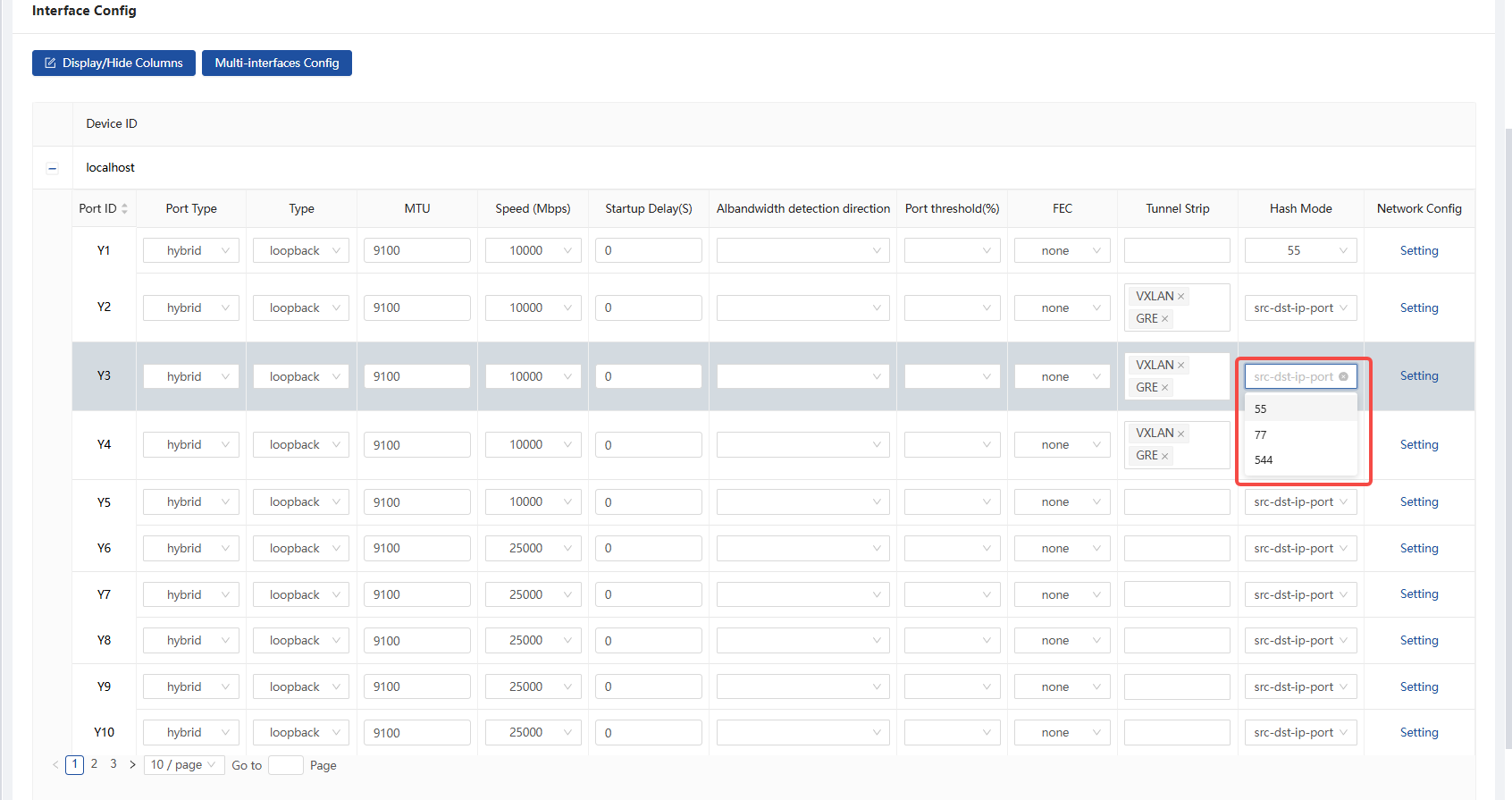
After configuring a custom hash mode, you can change the hash mode of each port to the custom hash mode on the port configuration page.
Hash Seed
Section titled “Hash Seed”Hash Seed: Adjust inner/outer hash factors
Hash Factor Range: 0~4294967295

Create LAG
Section titled “Create LAG”When a single output port bandwidth can not meet the output requirements, you can bundle multiple ports to form a load group, the traffic from the load group output will be based on the hash method to select different KEY for load balancing, and you can adjust the hash seed to ensure that different levels of equipment to process the same message and use the same KEY can achieve different load balancing effects. Prevent the problem of multi-level device load balancing when the load can not be loaded.
A port can only be added to one load balancing group.
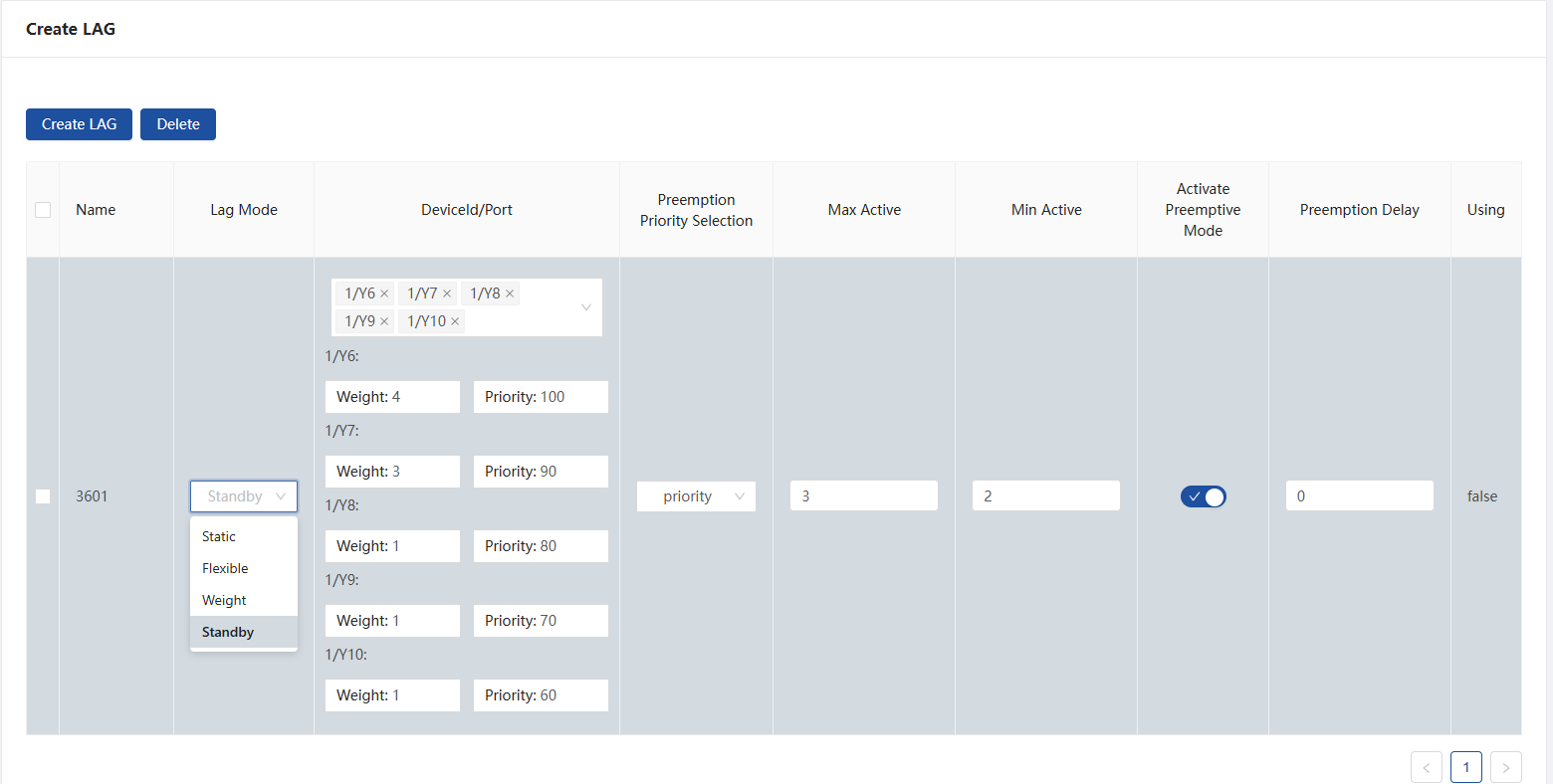
Load type can be selected in four modes:
- Static: When a port member goes down, the hash value of the port is recalculated.
- flex: When a port member goes down, only the traffic of the downed port is reloaded, while the traffic of other ports retains the previous load result.
- Weight: Based on the elasticity, you can set the weight ratio of each port, and the sum of the weight ratios of each port should not be greater than 64
- standby: You can additionally configure the master and standby ports and some LACP functions on top of the weights. the traffic will be redirected to the standby port when the master port is down.
standby lag configuration
| Key words | Description of parameters | Notes |
|---|---|---|
| weight | Distribute traffic based on weights. The sum of the weight ratios of each port is not greater than 64. | |
| priority | set the priority for the members of the added standy lag, the greater the priority the higher the priority, the smaller the port id the higher the priority when the priority is the same. | |
| preemption priority selection | priority: set to select the standby ports with the same weight according to the port priority sorting, and the standby ports without the same weight are not switched. | |
| speed: the device prioritizes the selection of standby ports with the same weight according to the rate and priority, and if there is no same rate, the standby ports are selected according to the priority. Spare ports without the same weight are not switched. | ||
| Min active | the number of members of the smallest UP in the lag, when it is less than this value, the LAG is down as a whole | |
| Max active | the number of members of the largest UP in the lag, when it is greater than this value, the other ports with low priority will be used as the standby ports | |
| Activate Preemptive Mode | If port preemption Enabled, after the primary port switches to the standby port, when the primary port is UP again, it will cut back to the primary port | |
| preemption delay | If port preemption Enabled, after the primary port switches to the standby port, when the primary port is UP again, it will cut back to the primary port until delay time over. |
Global Config
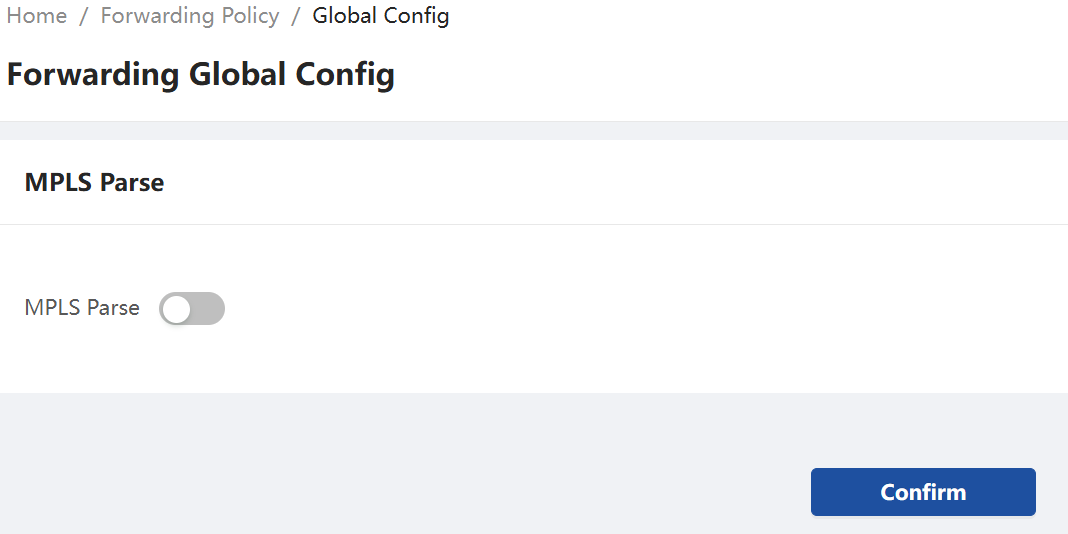
Section titled “Global Config”Enabled for MPLS/MPLS + PW messages can filter inner layer fields
Supported rule matching fields for MPLS packets
Section titled “Supported rule matching fields for MPLS packets”After enabling MPLS decoding, the rule matching items supported by common MPLS packets are as follows
Table 2 Supported rule matching fields for MPLS packets
| MPLS packets | Supported rule matching items | Description |
|---|---|---|
| MPLS + IPV4 | L2, EX, L3(src-ip, dst-ip, src-port, dst-port, ip-protocol) | |
| MPLS + ETH +(vlans)+ IPV4 | L2, EX, L3(src-mac, dst-mac, ethertype, src-ip, dst-ip, src-port, dst-port, ip-protocol) | |
| MPLS + PW + ETH +(vlans)+ IPV4 | L2, EX, L3(src-mac, dst-mac, ethertype, src-ip, dst-ip, src-port, dst-port, ip-protocol) | |
| MPLS + ETH + LACP | L2, EX, L3(src-mac, dst-mac, ethertype) | |
| MPLS + IPV6 | L2, EX, L3V6(src-ip, dst-ip, src-port, dst-port, ip-protocol) | Only support L2,EX,L3 default forward on CX102S |
| MPLS + PW + ETH +(vlans)+ IPV6 | L2, EX, L3V6(src-mac, dst-mac, ethertype, src-ip, dst-ip, src-port, dst-port, ip-protocol) | |
| MPLS + ETH +(vlans)+ IPV6 | L2, EX, L3V6(src-mac, dst-mac, ethertype, src-ip, dst-ip, src-port, dst-port, ip-protocol) |