


Multicast PIM-ASM/SSM Configuration Guide
This guide provides a comprehensive, step-by-step tutorial for establishing IPv4 Multicast networks on the Asterfusion Open Intelligent Gateway. By leveraging the high-performance VPP data plane, you will learn how to build multicast routing architectures that are both highly efficient and scalable for enterprise and data center environments.
What This Guide Will Accomplish
Section titled “What This Guide Will Accomplish”By following this guide, you will learn how to deploy robust multicast architectures. The configuration scenarios are structured into two distinct phases:
Phase 1: Establish ASM Underlay
Section titled “Phase 1: Establish ASM Underlay”- Scenario 1: Basic PIM-SM with Static RP Establishing a foundational PIM-ASM network using OSPF as the underlay routing protocol with a central Rendezvous Point.
- Scenario 2: Multicast over BGP Deploying PIM-ASM over a BGP underlay to validate advanced RPF checks within a typical Spine-Leaf topology.
Phase 2: ****Advanced Capabilities
Section titled “Phase 2: ****Advanced Capabilities”- Scenario 3: PIM-SSM Built directly upon the underlay established in Phase 1, this scenario demonstrates how to migrate to a highly efficient, RP-less architecture using IGMPv3 and explicit (S, G) tree building.
Scenario 1: Basic PIM-SM with Static RP
Section titled “Scenario 1: Basic PIM-SM with Static RP”Scenario Overview
Section titled “Scenario Overview”In this scenario, we establish a standard PIM-SM domain without using Loopback interfaces. The Spine’s Ethernet1 IP (10.0.1.2) serves as the Static RP for the entire domain.
Device Roles:
- Source DR (Leaf1): Gateway for the Multicast Source.
- RP (Spine): The central Rendezvous Point. Its downlink interface IP (10.0.1.2) is used as the RP address.
- Receiver DR (Leaf2): Gateway for the Receiver, running IGMPv3.
Network Topology Plan
Section titled “Network Topology Plan”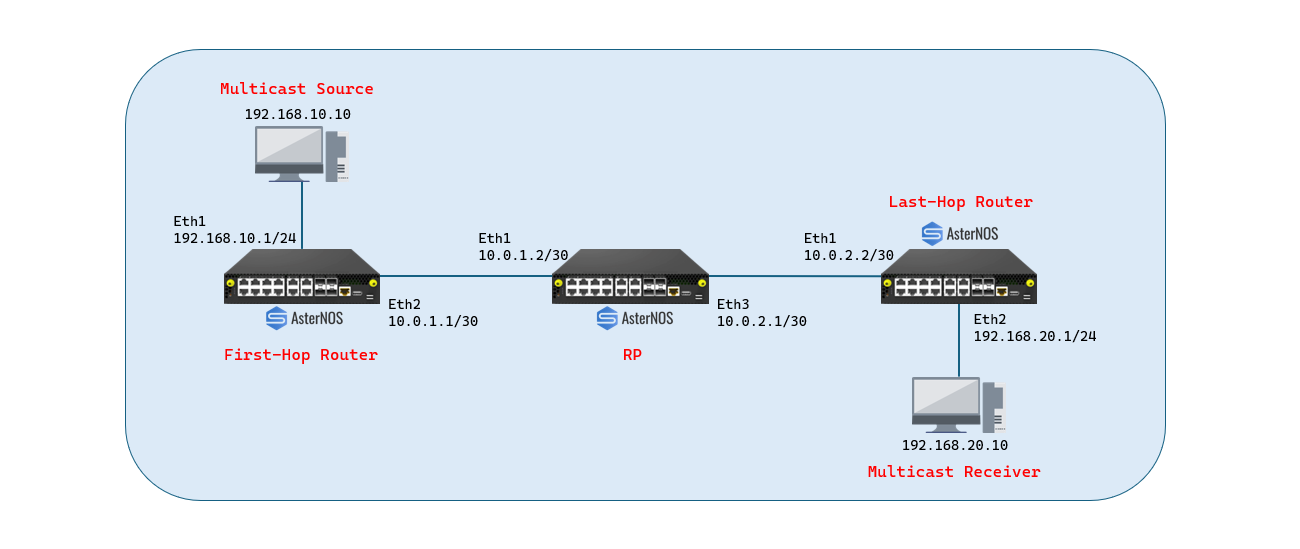
| Role | Device | Interface | IP Address | Function |
|---|---|---|---|---|
| Source DR | Leaf1 | Ethernet 1 (Downlink) | 192.168.10.1/24 | Connects to Source PC |
| Ethernet 2 (Uplink) | 10.0.1.1/30 | Connects to Spine (Ethernet1) | ||
| RP / Spine | Spine | Ethernet 1 (Downlink) | 10.0.1.2/30 | Connects to Leaf1 (RP Address) |
| Ethernet 3 (Downlink) | 10.0.2.1/30 | Connects to Leaf2 | ||
| Receiver DR | Leaf2 | Ethernet 1 (Uplink) | 10.0.2.2/30 | Connects to Spine (Ethernet3) |
| Ethernet 2 (Downlink) | 192.168.20.1/24 | Connects to Receiver PC |
Configuration Steps
Section titled “Configuration Steps”****Configure Source DR (Leaf1)
Section titled “****Configure Source DR (Leaf1)”Leaf1 connects to the Source PC via Ethernet 1 and the Spine via Ethernet 2. The critical step is enabling the unknown-multicast trap to ensure the first multicast packet is sent to the CPU for PIM registration.
sonic# configure terminal # 1.Configure Interfacessonic(config)# interface ethernet 1sonic(config-if-1)# description Link_to_Source_PCsonic(config-if-1)# ip address 192.168.10.1/24sonic(config-if-1)# ip pimsonic(config-if-1)# exit
sonic(config)# interface ethernet 2sonic(config-if-2)# description Link_to_Spinesonic(config-if-2)# ip address 10.0.1.1/30sonic(config-if-2)# ip pimsonic(config-if-2)# exit # 2.Enable Control Plane Trapsonic(config)# unknown-multicast trap # 3.Configure Static RPsonic(config)# ip pim rp 10.0.1.2 224.0.0.0/4 # 4.Configure Underlay Routing (OSPF)sonic(config)# router ospfsonic(config-router)# network 10.0.1.0/30 area 0sonic(config-router)# network 192.168.10.0/24 area 0sonic(config-router)# exit
### Configure Spine (RP)
The Spine acts as the Rendezvous Point. We use the IP address of Ethernet 1 (10.0.1.2) as the RP address for the entire network.
BlockQuote
1.Configure Interfaces
Section titled “1.Configure Interfaces”sonic(config)# interface ethernet 1 sonic(config-if-1)# description Link_to_Leaf1 sonic(config-if-1)# ip address 10.0.1.2/30 sonic(config-if-1)# ip pim sonic(config-if-1)# exit
sonic(config)# interface ethernet 3 sonic(config-if-3)# description Link_to_Leaf2 sonic(config-if-3)# ip address 10.0.2.1/30 sonic(config-if-3)# ip pim sonic(config-if-3)# exit
2.Configure Static RP
Section titled “2.Configure Static RP”sonic(config)# ip pim rp 10.0.1.2 224.0.0.0/4
3.Configure Underlay Routing (OSPF)
Section titled “3.Configure Underlay Routing (OSPF)”sonic(config)# router ospf sonic(config-router)# network 10.0.1.0/30 area 0 sonic(config-router)# network 10.0.2.0/30 area 0 sonic(config-router)# exit
Configure Receiver DR (Leaf2)
Section titled “Configure Receiver DR (Leaf2)”Leaf2 connects to the Spine via Ethernet 1 and the Receiver PC via Ethernet 2. IGMPv3 is explicitly enabled on the receiver-facing interface.
1.Configure Interfacessonic(config)# interface ethernet 1sonic(config-if-1)# description Link_to_Spinesonic(config-if-1)# ip address 10.0.2.2/30sonic(config-if-1)# ip pimsonic(config-if-1)# exit
sonic(config)# interface ethernet 2sonic(config-if-2)# description Link_to_Receiver_PCsonic(config-if-2)# ip address 192.168.20.1/24sonic(config-if-2)# ip igmpsonic(config-if-2)# ip pimsonic(config-if)# exit # 2.Configure Static RPsonic(config)# ip pim rp 10.0.1.2 224.0.0.0/4 # 3.Configure Underlay Routing (OSPF)sonic(config)# router ospfsonic(config-router)# network 10.0.2.0/30 area 0sonic(config-router)# network 192.168.20.0/24 area 0sonic(config-router)# exit
***
## Verification
### ****Control Plane Verification
- Verify PIM Neighbors (on Spine)
BlockQuote{indent=“1”} sonic# show ip pim neighbor

- Verify RP Mapping (Any Device)
sonic# show ip pim rp-info


****Data Plane Verification
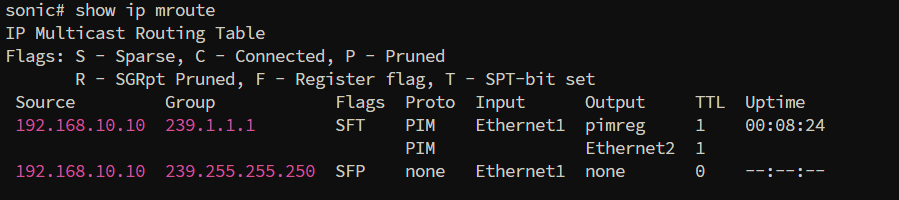
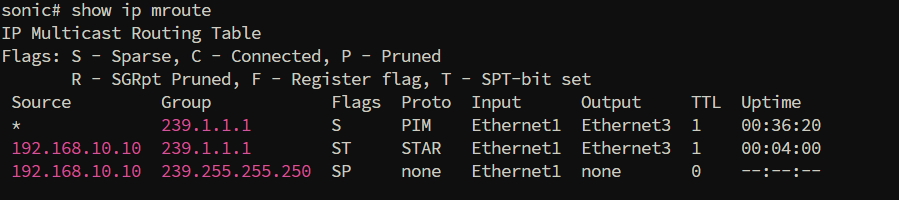
Section titled “****Data Plane Verification”Send multicast traffic from Source (192.168.10.10) to Group (239.1.1.1) and have the Receiver join the group.
- Leaf1 (Source DR) - Verify Registration
sonic# show ip mroute
- Spine (RP) - Verify Forwarding Tree
sonic# show ip mroute
- Leaf2 (Receiver DR) - Verify Reception
sonic# show ip mroute

Scenario 2: Multicast over BGP (Data Center Architecture)
Section titled “Scenario 2: Multicast over BGP (Data Center Architecture)”Scenario Overview
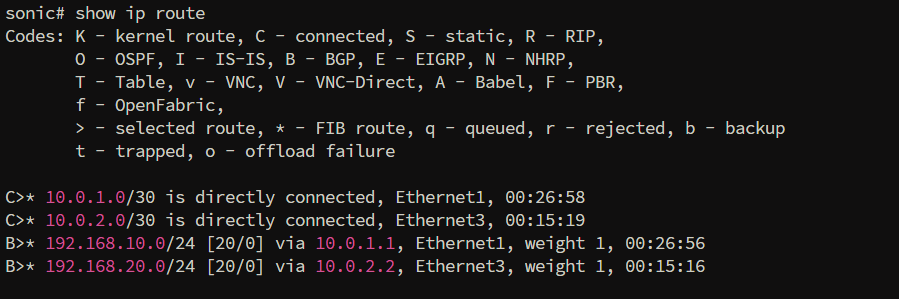
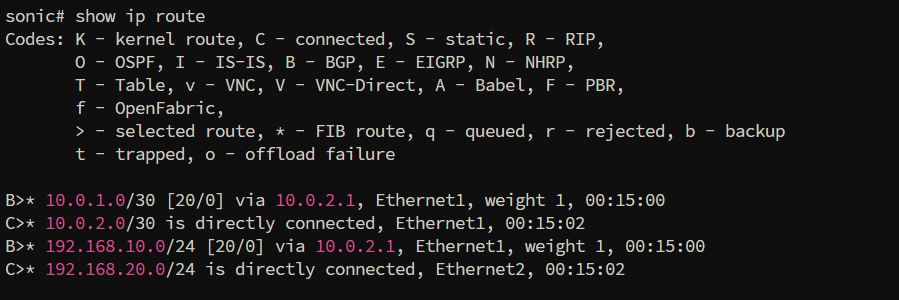
Section titled “Scenario Overview”This scenario replicates a typical Data Center Spine-Leaf architecture using BGP as the underlay routing protocol. Unlike OSPF, BGP does not automatically flood routing information. This scenario validates that the AsterNOS PIM stack can correctly perform RPF (Reverse Path Forwarding) checks based on BGP routing tables.
Key Changes:
- Underlay Protocol: Replaced OSPF with BGP.
- Routing Logic: Leaf2 must learn the RP address via BGP to send PIM Join messages.
Configuration Steps
Section titled “Configuration Steps”Configure Source DR (Leaf1)
Section titled “Configure Source DR (Leaf1)”Leaf1 connects to the Source (192.168.10.10). It must advertise the source subnet into BGP so the Spine knows where the multicast source is located.
1.Interface Configurationsonic(config)# interface ethernet 1sonic(config-if-1)# ip address 192.168.10.1/24sonic(config-if-1)# ip pimsonic(config-if-1)# exit
sonic(config)# interface ethernet 2sonic(config-if-2)# ip address 10.0.1.1/30sonic(config-if-2)# ip pimsonic(config-if-2)# exit # 2. Enable Control Plane Trapsonic#(config)# unknown-multicast trap # 3.Static RP Configurationsonic(config)# ip pim rp 10.0.1.2 224.0.0.0/4 # 4.BGP Configuration (AS 65001)sonic(config)# router bgp 65001sonic(config-router)# bgp router-id 1.1.1.1sonic(config-router)# no bgp ebgp-requires-policysonic(config-router)# bgp default ipv4-unicast
sonic(config-router)# neighbor 10.0.1.2 remote-as 65000
sonic(config-router)# address-family ipv4 unicastsonic(config-router-af)# neighbor 10.0.1.2 activatesonic(config-router-af)# network 192.168.10.0/24sonic(config-router-af)# exitsonic(config-router)# exit
### Configure Spine (RP)
BlockQuote
1.Interface Configuration
Section titled “1.Interface Configuration”sonic(config)# interface ethernet 1 sonic(config-if-1)# ip address 10.0.1.2/30 sonic(config-if-1)# ip pim sonic(config-if-1)# exit
sonic(config)# interface ethernet 3 sonic(config-if-3)# ip address 10.0.2.1/30 sonic(config-if-3)# ip pim sonic(config-if-3)# exit
2.Static RP Configuration
Section titled “2.Static RP Configuration”sonic(config)# ip pim rp 10.0.1.2 224.0.0.0/4
3.BGP Configuration (AS 65000)
Section titled “3.BGP Configuration (AS 65000)”sonic(config)# router bgp 65000 sonic(config-router)# bgp router-id 2.2.2.2 sonic(config-router)# no bgp ebgp-requires-policy sonic(config-router)# bgp default ipv4-unicast
sonic(config-router)# neighbor 10.0.1.1 remote-as 65001 sonic(config-router)# neighbor 10.0.2.2 remote-as 65002
sonic(config-router)# address-family ipv4 unicast sonic(config-router-af)# neighbor 10.0.1.1 activate sonic(config-router-af)# neighbor 10.0.2.2 activate sonic(config-router-af)# network 10.0.1.0/30 sonic(config-router-af)# exit sonic(config-router)# exit
Configure Receiver DR (Leaf2)
Section titled “Configure Receiver DR (Leaf2)”Leaf2 (AS 65002) connects to the Receiver. It learns the RP route via BGP.
1.Interface Configurationsonic(config)# interface ethernet 1sonic(config-if-1)# ip address 10.0.2.2/30sonic(config-if-1)# ip pimsonic(config-if-1)# exit
sonic(config)# interface ethernet 2sonic(config-if-2)# ip address 192.168.20.1/24sonic(config-if-2)# ip pimsonic(config-if-2)# ip igmpsonic(config-if-2)# exit # 2.Static RP Configurationsonic(config)# ip pim rp 10.0.1.2 224.0.0.0/4 # 3.BGP Configuration (AS 65002)sonic(config)# router bgp 65002sonic(config-router)# bgp router-id 3.3.3.3sonic(config-router)# no bgp ebgp-requires-policysonic(config-router)# bgp default ipv4-unicast
sonic(config-router)# neighbor 10.0.2.1 remote-as 65000
sonic(config-router)# address-family ipv4 unicastsonic(config-router-af)# neighbor 10.0.2.1 activatesonic(config-router-af)# network 192.168.20.0/24sonic(config-router-af)# exitsonic(config-router)# exit
## Verification
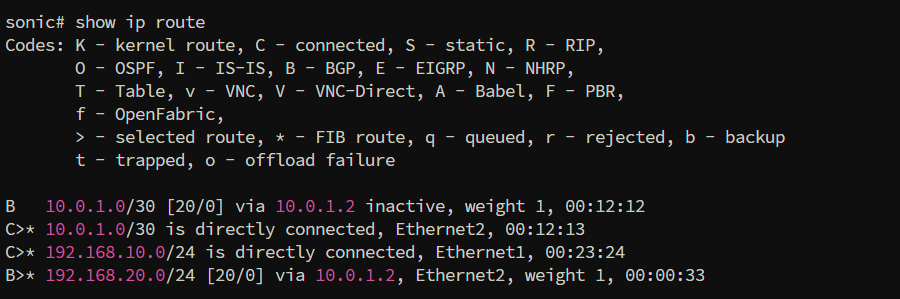
### ****Verify Underlay Routing (BGP)
BlockQuote sonic# show ip route
- Leaf1:
- RP:
- Leaf2:
Verify Multicast Routing (PIM over BGP)
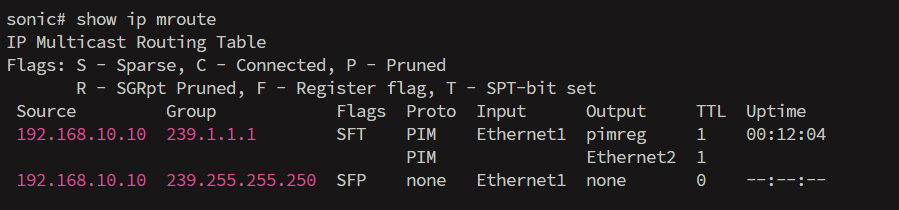
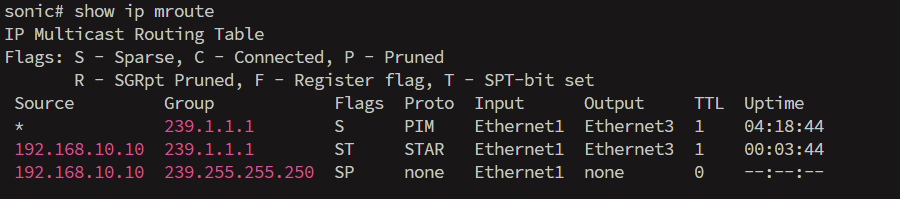
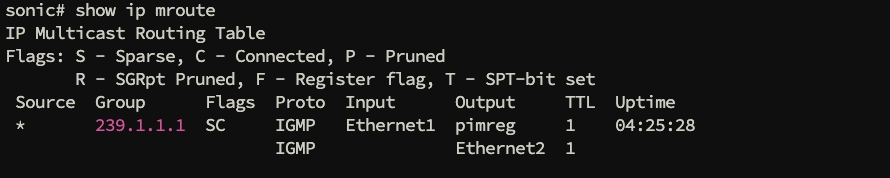
Section titled “Verify Multicast Routing (PIM over BGP)”Check the multicast routing table after the receiver joins the group.
sonic# show ip mroute
- Leaf1:
- RP:
- Leaf2:
***
Scenario 3: PIM-SSM (Source Specific Multicast)
## ****Scenario Overview
This scenario demonstrates the transition from ASM to PIM-SSM. In this mode, the RP is eliminated, and the multicast distribution tree is built directly from the receiver to the source using IGMPv3.
## Configuration Steps****
This configuration assumes the physical underlay (Scenario 1 or 2) is **already** functional.
### Upgrade to IGMPv3(Leaf2 Only)
To process Source-Specific joins, the receiver-facing interface on Leaf2 must be upgraded to IGMP version 3.BlockQuote
sonic(config)# interface ethernet 2 sonic(config-if)# ip igmp version 3 sonic(config-if)# exit
Global RP Cleanup (All Devices)
Section titled “Global RP Cleanup (All Devices)”The core of SSM is the complete absence of a Rendezvous Point. You must remove the static RP configuration from Leaf1, Spine, and Leaf2 to tear down the ASM shared tree mechanism.
sonic(config)# no ip pim rp 10.0.1.2 224.0.0.0/4note Note: (No further router configuration is needed. The network is now ready for SSM.)
Flow Triggering Requirements
Section titled “Flow Triggering Requirements”To establish the SSM Shortest Path Tree (SPT), the following conditions must be met by the end-stations:
- Source Side: Outbound multicast traffic must target a destination IP within
232.0.0.0/8. - Receiver Side: The host must issue an **IGMPv3 Membership Report **that includes the specific Source IP
(192.168.10.10)and Group IP.
Verification
Section titled “Verification”Verify IGMPv3 Join
Section titled “Verify IGMPv3 Join”Check the IGMP groups on Leaf2 to ensure the receiver has successfully sent an IGMPv3 Source-Specific Join.
BlockQuote sonic# show ip igmp groups

Verify PIM-SSM Routing Table
Section titled “Verify PIM-SSM Routing Table”Check the multicast routing table on Leaf2 to confirm the Shortest Path Tree (SPT) has been established directly to the source.
sonic# show ip mroute

Conclusion
Section titled “Conclusion”This guide has verified the comprehensive multicast routing capabilities of AsterNOS, enabling highly efficient traffic distribution across diverse topologies. The completed scenarios demonstrate that AsterNOS provides the essential flexibility required for modern networks, seamlessly supporting both traditional PIM-ASM and advanced, RP-less PIM-SSM architectures.